Git Integration
Connect an external Git repository to keep the code that drives Infrahub — schemas, Transformations, Generators, checks, GraphQL queries, and artifact definitions — under version control, next to your infrastructure data. Infrahub imports that code and keeps it in sync as the repository changes.
To set one up, see connect a repository, configure .infrahub.yml, and filter which branches sync.
Two version-control planes
Infrahub has two separate version-control systems, and understanding the split is the key to the rest of this section.
- The graph — your infrastructure data (objects) and schema. Infrahub versions the graph itself: you branch it, change it, review the diff in a Proposed Change, and merge. This is Git-like version control, but the store is Infrahub's database, not a Git repository.
- Git — the code that describes intent: schemas, Transformations, Generators, checks, GraphQL queries, and artifact definitions, declared in
.infrahub.yml. Infrahub reads this code from the repository and imports it.
The link between the two runs one way: from Git into Infrahub. Git is where you author code intent; Infrahub imports it and applies it to the graph. Data moves the other way only inside Infrahub — when you merge a branch, the change is applied to the graph, not pushed back to Git. A read-write repository does write one thing back to Git, and only one; the repository types section covers it.
Why Git integration matters
Modern infrastructure management requires both structured data (network configurations, device inventories) and code (automation scripts, templates, validation logic). By integrating with Git repositories, Infrahub bridges these two worlds, enabling:
- Unified version control: Both your infrastructure data and automation code follow the same branching and merging workflows
- Familiar developer workflows: Teams can leverage existing Git practices and tooling
- Separation of concerns: Infrastructure data resides in Infrahub's graph database while code remains in Git
- Enhanced collaboration: Multiple teams can work on different aspects of infrastructure without conflicts
Repository types and their design rationale
Infrahub supports two distinct repository connection types, each designed for specific use cases and operational requirements.
Repository: read-write integration
The standard Repository type gives Infrahub read-write access to Git. Infrahub imports code from every branch automatically, and on a Proposed Change merge it updates the linked Git branch — for branches that sync with Git (see Controlling whether a branch reaches Git).
Design principles:
- Branch parity: each branch in the Git repository has a corresponding branch in Infrahub
- Automatic import: Infrahub imports changes from Git in the background, without a manual trigger
- One write-back on merge: merging a Proposed Change updates the linked branch in Git (see merging branches below); this moves code intent, never your infrastructure data
How it works internally:
When you create a Repository connection, Infrahub:
- Clones the repository to local storage
- Creates Git worktrees for each branch to enable parallel operations
- Tracks all remote branches and creates corresponding Infrahub branches
- Runs background synchronization tasks every few seconds to detect changes
- Parses the
.infrahub.ymlfile to determine which resources to import
When you merge a Proposed Change and the source branch is set to sync with Git, Infrahub merges the corresponding branch in the Git repository and pushes the result to the remote. By default this is a fast-forward when possible, so no merge commit is created (see merging branches). Only the code tracked in Git moves; your infrastructure data stays in the graph.
A read-write repository has a default_branch attribute (defaulting to main) that names the Git branch mapped to Infrahub's default branch. Merges into Infrahub's default branch are pushed back to that Git branch on the remote, and that Git branch is imported as Infrahub's default branch, so a repository can use a non-main Git default branch. When default_branch is not main, a Git branch literally named main is not imported.
Read-only Repository: controlled unidirectional flow
The Read-only Repository type offers a simpler, unidirectional integration designed for scenarios where you need to consume resources from Git without modifying the external repository.
Design principles:
- Single reference tracking: links one specific Git ref (branch, tag, or commit)
- Manual synchronization: Infrahub does not poll a read-only repository; you update it by changing the
refor using the Import latest commit action - Protection of external resources: guarantees no modifications to the external repository
How it works internally:
Read-only repositories:
- Track a single Git reference rather than all branches
- Import changes only when you change the
refor run Import latest commit — Infrahub does not poll read-only repositories - Import resources according to the
.infrahub.ymlconfiguration - Maintain a simpler state model without complex branch synchronization logic
Architecture and data flow
Understanding how Infrahub manages Git repositories helps clarify the system's capabilities and constraints.
Component responsibilities
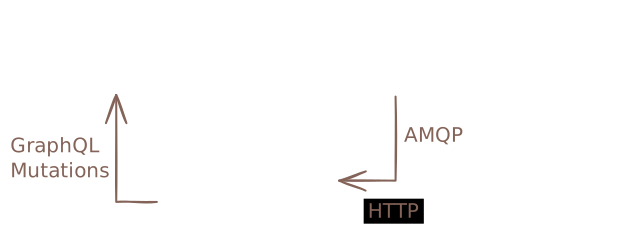
The architecture carefully separates concerns between components:
- Infrahub API Server: Never directly connects to Git repositories; handles GraphQL mutations and queries
- Task Workers: Manage all Git operations including cloning, fetching, and pushing
- Message Broker: Coordinates communication between API server and task workers
- File System Storage: Maintains local clones and worktrees in
git.repositories_directory
This separation ensures that Git operations don't block API requests and enables horizontal scaling of task workers for improved performance.
Synchronization mechanisms
For standard Repositories:
- Background tasks poll for changes multiple times per minute
- Each sync operation fetches from origin and compares local vs. remote state
- New branches automatically trigger Infrahub branch creation
- Updated branches trigger re-import of changed resources
For Read-only Repositories:
- No automatic synchronization occurs
- Updates can be triggered by modifying the
refproperty to point to a different branch, tag, or commit - Alternatively, use the Import latest commit action to fetch the latest commit for the current ref from the remote without changing the ref
- Each update fetches the specified commit and imports resources according to configuration
Merging branches
This applies only to standard repositories:
By default, Infrahub runs a standard git merge, which fast-forwards when the history allows it. When merging a branch linked to Git, Infrahub moves the destination branch pointer forward without creating a merge commit; if the branches have diverged, Git falls back to a merge commit.
You can configure Infrahub to always create a merge commit by setting the INFRAHUB_GIT_USE_EXPLICIT_MERGE_COMMIT environment variable to true. This approach maintains a more explicit commit history and improves auditability.
Controlling whether a branch reaches Git
Each Infrahub branch has a sync_with_git property, chosen when you create the branch. It controls whether a branch created in Infrahub is extended to Git: when it is on, Infrahub creates a matching branch in every read-write repository and, on a Proposed Change merge, merges that branch in Git. When it is off, the branch stays inside Infrahub's graph.
The name reads as if it governs importing Git branches into Infrahub — it does not. Import always runs from Git to Infrahub regardless of this property; sync_with_git only affects branches going the other way, from Infrahub out to Git. Many data-only changes never need a Git branch at all, since that data lives only in the graph.
The .infrahub.yml configuration file
The .infrahub.yml file acts as a manifest, declaring which resources Infrahub should import from the repository. This declarative approach enables:
- Selective importing of repository contents based on specific needs
- Clear boundaries between Infrahub-managed and external resources
- Version-specific configurations (different branches can have different
.infrahub.ymlfiles)
For detailed information about .infrahub.yml configuration and syntax, see Infrahub configuration file.
Status tracking and health monitoring
Repositories track their operational state through three distinct status dimensions, each serving a different monitoring purpose.
Admin status: lifecycle management
Tracks whether Infrahub is actively using the repository:
- Active: Repository is in production use
- Inactive: Repository is disabled or unused
- Staging: Repository is pending activation via Proposed Change
Operational status: connectivity health
Monitors the connection between Infrahub and the Git server:
- Online: Successfully connected and authenticated
- Credential Error: Authentication failure
- Connectivity Error: Network or connectivity issue
- Error: Other initialization or configuration problems
- Unknown: Status cannot be determined
Sync status: data consistency
Indicates the state of data synchronization:
- In sync: All repository resources are current in Infrahub
- Syncing: Synchronization operation in progress
- Error (import): Failed to import resources from repository
- Unknown: Synchronization state cannot be determined
Repository actions and operations
Beyond basic synchronization, repositories support administrative actions for troubleshooting and maintenance:
- Check connectivity: Validates network access and authentication without modifying repository content. The result is recorded in the repository's operational status: a successful check sets it to Online, while a failure sets it to the matching error state (Credential Error, Connectivity Error, or Error)
- Reimport current commit: Forces re-processing of the current commit without fetching new changes, useful for recovering from import errors
- Import latest commit (read-only repositories only): Fetches the latest commit from the remote for the tracked ref and imports its resources. This is useful when the remote repository has new changes and you want to pull them without manually updating the
refproperty. Unlike changing theref, this operation keeps the same ref but updates to whatever commit that ref currently points to on the remote
Design trade-offs and constraints
The current architecture makes several important trade-offs:
Branch hierarchy limitations
Infrahub currently supports only single-level branch hierarchy (branches created from main). This simplification:
- Reduces complexity in conflict resolution
- Ensures predictable merge paths
- May limit advanced Git workflows
Synchronization frequency
The polling-based synchronization approach:
- Provides near-real-time updates (within seconds)
- Avoids webhook complexity and firewall issues
- May introduce slight delays compared to push-based systems
Common misconceptions
- Merging a change in Infrahub pushes data to Git. It does not. A data merge is applied to the graph. The only thing a merge writes to Git is the code-intent branch of a read-write repository, updated on a Proposed Change merge.
sync_with_gitcontrols importing Git branches into Infrahub. It does not. It controls whether a branch created in Infrahub is extended out to Git. Import always runs from Git to Infrahub.- A read-write repository has an "Import latest commit" button. It does not. Read-write repositories import automatically in the background; Import latest commit is a read-only repository action, used because read-only repositories are not polled.
Further reading
- How to connect external Git repositories - Practical guide for setting up repositories
- Infrahub configuration file - Detailed
.infrahub.ymlreference - Selective branch synchronization - Controlling which Git branches sync to Infrahub
- Proposed Changes - Understanding the merge and review process
- Version control in Infrahub - Broader context of Infrahub's version control features